Technical website support is the ongoing process of keeping a website secure, fast, updated, functional, and ready for users. Many business owners think their website is complete once it goes live, but a website needs regular care after launch. Without proper support, small issues can turn into serious problems such as downtime, broken forms, slow loading speed, security threats, lost traffic, and missed customers.
Your website is often the first place people interact with your business. If it loads slowly, shows errors, has outdated information, or fails to work on mobile devices, visitors may leave and choose a competitor. This is why technical website support is not just an extra service. It is an important part of protecting your online presence.
A good support plan helps you prevent problems, fix errors quickly, improve user experience, and keep your website healthy for search engines and real visitors.
What Is Technical Website Support?
Technical website support means managing the technical side of a website after it has been developed and launched. It includes monitoring, maintenance, security, updates, backups, bug fixing, performance optimization, and technical improvements.
In simple words, it is like regular maintenance for a car. You may buy a good car, but it still needs oil changes, tire checks, cleaning, servicing, and repairs. A website works the same way. Even if it is built by professionals, it still needs regular checks and updates to perform well.
Technical website support can include:
- Website uptime monitoring
- CMS, theme, and plugin updates
- Website backups
- Malware scanning and removal
- Website speed optimization
- Fixing broken links
- Solving server errors
- Fixing contact forms
- SSL certificate checks
- Domain and hosting monitoring
- Technical SEO fixes
- Database cleanup
- Mobile usability improvements
- Adding new features
- Emergency website recovery
The main goal is to make sure your website stays live, safe, fast, and easy to use.
Why Technical Website Support Matters
A website depends on many moving parts. Hosting, domain settings, SSL certificates, databases, code, plugins, themes, forms, images, scripts, and third-party tools all need to work together.
If one part fails, your website can break.
For example:
- A plugin update can break your contact form.
- An expired SSL certificate can show a security warning.
- A hosting issue can make your website go offline.
- A malware attack can redirect visitors to spam pages.
- A slow server can hurt user experience.
- Broken links can damage trust and SEO.
- An outdated CMS can create security risks.
Technical website support helps prevent these issues and fix them before they affect your users.
What Happens If You Ignore Website Support?
Ignoring technical support may not create problems immediately, but over time your website becomes weaker. Old software, outdated plugins, heavy images, broken pages, and security gaps can build up silently.
Without support, you may face:
- Website downtime
- Slow page loading
- Security vulnerabilities
- Lost leads and sales
- Broken website features
- Outdated content
- Poor mobile experience
- Search ranking drops
- Malware infections
- Data loss
- Higher repair costs later
A website that is not maintained can damage your brand reputation. Visitors may think your business is inactive, careless, or unprofessional.
Key Services Included in Technical Website Support
Technical website support can include different services depending on the type of website and support plan. Below are the most important parts of a complete support service.
Website Uptime Monitoring
Website uptime monitoring checks whether your website is online and accessible. If your website goes down, the support team receives an alert and can take action.
This is important because you may not notice downtime immediately. Your customers may notice it first. If your website is used for leads, bookings, sales, or customer support, every minute of downtime can cost money.
Uptime monitoring can detect:
- Server downtime
- Hosting failures
- DNS problems
- SSL issues
- Slow server response
- Website errors
A strong support plan should include 24/7 monitoring, even if human response is available during business hours.
Website Backups
Backups are one of the most important parts of technical website support. A backup is a saved copy of your website files and database.
If your website breaks, gets hacked, or loses data, a backup can help restore it.
A good backup system should include:
- Automatic backups
- Database backups
- File backups
- Cloud storage
- Backup version history
- Secure storage
- Regular restore testing
The most important point is this: a backup is only useful if it can be restored successfully. Many website owners create backups but never test them. Professional support should include backup testing.
CMS, Theme, and Plugin Updates
Most modern websites use a CMS such as WordPress, Shopify, Joomla, Drupal, or a custom platform. These systems require updates to stay secure and functional.
Updates may include:
- CMS core updates
- Theme updates
- Plugin updates
- Extension updates
- Security patches
- Compatibility fixes
However, updates should be done carefully. Updating without a backup can break a website. A professional support team usually creates a backup first, updates the website, and then tests important pages and features.
Website Security Support
Security is one of the biggest reasons businesses need technical website support. Hackers often target websites with outdated software, weak passwords, poor hosting, or unprotected admin areas.
Website security support may include:
- Malware scanning
- Malware removal
- Firewall setup
- Login protection
- Two-factor authentication
- File permission checks
- Spam protection
- Security patching
- Blocking suspicious traffic
- Removing unauthorized users
- Closing backdoors
A hacked website can damage your business badly. It can expose data, hurt customer trust, and cause search engines or browsers to warn users about your site.
Website Speed Optimization
Website speed matters because users expect fast pages. If your website takes too long to load, visitors may leave before reading your content or contacting you.
Technical website support can improve speed by:
- Compressing large images
- Enabling caching
- Reducing unnecessary scripts
- Cleaning the database
- Removing unused plugins
- Improving server response time
- Optimizing CSS and JavaScript
- Using lazy loading
- Fixing Core Web Vitals issues
A faster website gives users a better experience and can support stronger SEO performance.
Technical SEO Support
Technical SEO helps search engines crawl, understand, and index your website properly. Even great content may struggle to rank if the website has technical problems.
Technical SEO support may include:
- Fixing crawl errors
- Checking indexation issues
- Updating XML sitemaps
- Managing robots.txt
- Fixing canonical tags
- Improving internal linking
- Redirecting broken URLs
- Fixing duplicate pages
- Adding structured data
- Improving mobile usability
- Fixing 404 errors
- Checking page speed issues
This is an area many competitors do not explain properly. Technical website support is not only about fixing bugs. It also helps your website stay search-engine friendly.
Broken Link and 404 Error Fixes
Broken links create a poor user experience. When users click a link and land on a missing page, they may lose trust in your website.
Broken links can happen when:
- Pages are deleted
- URLs are changed
- Old blog posts link to removed pages
- External websites remove their pages
- Products are discontinued
- Website migration is done incorrectly
A support team can find broken links, fix them, or create proper redirects.
Contact Form and Functionality Testing
Many business websites depend on contact forms, quote forms, booking forms, newsletter forms, and checkout forms. If these stop working, you may lose leads without knowing it.
Technical support can test and fix:
- Contact forms
- Booking forms
- Newsletter forms
- Payment forms
- Login forms
- Search bars
- Filters
- Buttons
- Popups
- Live chat tools
This is especially important for service businesses because a broken form means lost customers.
SSL Certificate and Domain Monitoring
Your SSL certificate helps secure your website and shows the lock icon in the browser. If it expires, visitors may see a warning that your website is unsafe.
Technical website support can monitor:
- SSL expiry
- Domain expiry
- Hosting renewal
- DNS settings
- Email records
- Redirect settings
These small technical details are easy to forget, but they can take your website offline if ignored.
Hosting and Server Support
Your hosting affects your website speed, uptime, and stability. If your hosting is weak or overloaded, your website may become slow or unavailable.
Technical support can help with:
- Hosting issues
- Server errors
- Disk space problems
- PHP version updates
- Database errors
- Memory limits
- Email delivery issues
- Server migration
- DNS troubleshooting
If your website grows, your hosting needs may also change. A support team can recommend better hosting when needed.
Malware Removal and Emergency Recovery
Sometimes websites face serious problems. Your site may get hacked, show spam pages, redirect users, or display a critical error.
Emergency support may include:
- Restoring website access
- Removing malware
- Cleaning infected files
- Restoring from backup
- Fixing database errors
- Removing suspicious admin users
- Securing login pages
- Checking server files
- Submitting reconsideration after cleanup if needed
Emergency support is valuable because fast action can reduce damage.
Content and Information Updates
Some technical support plans also include content updates. This means the support team can update text, images, banners, blog posts, product details, service pages, phone numbers, addresses, and team information.
This matters because outdated content can reduce trust.
For example, users may leave if they see:
- Old prices
- Expired offers
- Outdated services
- Old contact details
- Broken images
- Old blog dates
- Inactive-looking news pages
Fresh content shows users that your business is active.
Website Improvements and New Features
Technical website support can also include small improvements and new features.
You may need to add:
- New landing pages
- Service sections
- Lead forms
- Booking systems
- Payment options
- Calculators
- Tracking codes
- Live chat
- Blog sections
- Product pages
- FAQ sections
- Review widgets
- Newsletter signup forms
A support team that already knows your website can make these changes faster than a new developer who needs time to understand everything.
Technical Website Support vs Website Maintenance
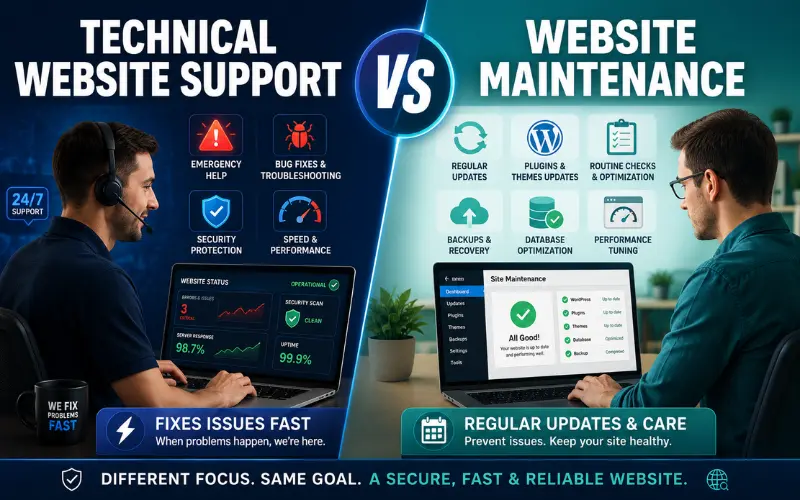
Many people use these terms together, but they are slightly different.
Website maintenance usually means regular care, such as updates, backups, security checks, and content changes.
Technical website support is broader. It includes maintenance plus troubleshooting, bug fixing, technical SEO, emergency recovery, hosting support, performance optimization, and custom technical help.
In simple terms:
- Website maintenance keeps your website healthy.
- Technical website support fixes problems, prevents risks, and improves the website over time.
Who Needs Technical Website Support?
Almost every website can benefit from support, but some websites need it more than others.
Business Websites
Business websites need support because they generate leads, build trust, and represent the company online. A broken contact form or slow service page can directly affect sales.
E-Commerce Websites
Online stores need stronger support because they include product pages, cart systems, payment gateways, checkout pages, customer accounts, and order emails.
For e-commerce websites, support should also include:
- Checkout testing
- Payment gateway checks
- Product page monitoring
- Cart error fixes
- Order email testing
- Security checks
- Stock and catalog support
Even a small technical problem can stop customers from buying.
Blogs and Publishing Websites
Blogs need support to manage speed, broken links, SEO, image optimization, content updates, and security. Large blogs can collect many technical issues over time.
Corporate Websites
Corporate websites need reliable support because they often include company information, careers pages, investor information, downloadable files, media updates, and contact forms.
Service-Based Websites
Service websites need working lead forms, landing pages, call buttons, booking forms, and fast mobile performance. Support keeps these important features working.
Signs Your Website Needs Technical Support
Your website may need technical support if:
- It loads slowly
- It often goes offline
- Your forms are not working
- Your website has outdated plugins
- Your CMS has not been updated
- You see broken pages
- Your website was hacked before
- You do not have regular backups
- Your mobile layout looks poor
- Your SSL certificate expired before
- Your traffic dropped because of technical issues
- Your website shows errors
- You do not know who will fix urgent problems
- Your website depends on leads or sales
If your website supports your business, then support is not optional. It protects your investment.
Benefits of Technical Website Support
Better Website Security
Regular updates, malware scans, firewalls, and secure backups reduce security risks. A supported website is harder to attack than an ignored website.
Faster Problem Solving
When you already have a support team, you do not need to search for a developer every time something breaks. The team understands your website and can act faster.
Less Downtime
Monitoring helps detect problems early. Quick action reduces downtime and protects your visitors, leads, and sales.
Improved User Experience
A supported website is usually faster, cleaner, more stable, and easier to use. This helps visitors stay longer and take action.
Better SEO Health
Technical support can fix SEO problems such as slow pages, broken links, crawl errors, poor mobile usability, missing redirects, and indexation issues.
Lower Long-Term Costs
Small problems are usually cheaper to fix early. If you ignore them, they can become expensive emergencies.
More Trust From Visitors
A website that works smoothly creates trust. Users are more likely to contact, buy, subscribe, or return when the website feels professional.
What Should a Good Technical Website Support Plan Include?
A complete support plan should include:
- Uptime monitoring
- Regular backups
- Backup restore testing
- CMS updates
- Plugin and theme updates
- Security checks
- Malware scanning
- Speed optimization
- Broken link checks
- Contact form testing
- Technical SEO checks
- SSL monitoring
- Hosting support
- Error fixing
- Monthly reports
- Emergency support options
For e-commerce websites, the plan should also include checkout testing, payment gateway checks, cart testing, and stronger security monitoring.
How Often Should a Website Be Maintained?
The answer depends on the type of website.
- A small business website may need monthly support.
- A blog may need weekly or monthly checks.
- An e-commerce website may need daily monitoring.
- A high-traffic website may need continuous monitoring and priority support.
At minimum, every website should have:
- Regular backups
- Security updates
- Uptime monitoring
- Monthly technical checks
- Contact form testing
- SSL monitoring
Can You Handle Technical Website Support Yourself?
You can manage some simple tasks yourself if you have basic technical knowledge. For example, you can update text, upload images, renew hosting, or publish blog posts.
However, advanced technical work can be risky.
You should be careful with:
- Plugin updates
- Theme updates
- Code changes
- Database edits
- Server settings
- Malware cleanup
- Redirect changes
- SEO technical fixes
One wrong change can break the website. If your website is important for your business, professional support is usually safer.
How to Choose the Right Technical Website Support Provider
Choosing the right provider is important. Do not choose based only on the lowest price. Look for reliability, experience, clear communication, and a proper support process.
Before hiring a support provider, ask:
- What services are included?
- What is your response time?
- Do you provide emergency support?
- Do you monitor uptime?
- How often do you create backups?
- Do you test backups?
- Do you handle malware removal?
- Do you provide technical SEO support?
- Do you support my CMS or platform?
- Do you provide monthly reports?
- What tasks cost extra?
- Do you use a staging site for major updates?
- How do you handle security problems?
- Will I have a dedicated contact person?
A good support provider should explain everything clearly. You should know what is included, what is not included, and how quickly they respond.
What Is an SLA in Website Support?
SLA stands for Service Level Agreement. It explains the support provider’s response time, responsibilities, and service limits.
An SLA may include:
- Response time
- Support hours
- Emergency support rules
- Included services
- Excluded services
- Monthly support hours
- Uptime targets
- Priority levels
- Communication methods
For example, urgent issues may have a faster response time than small design changes.
A clear SLA helps avoid confusion and sets the right expectations.
Common Technical Website Support Mistakes to Avoid
Many website owners make mistakes that can harm their websites.
Avoid these common mistakes:
- Not keeping backups
- Updating plugins without testing
- Using weak passwords
- Ignoring security warnings
- Forgetting SSL renewal
- Using cheap and slow hosting
- Installing too many plugins
- Not checking contact forms
- Ignoring broken links
- Not monitoring uptime
- Not checking mobile layout
- Not reviewing technical SEO issues
- Waiting until the website breaks
Good technical support prevents these problems before they become serious.
Technical Website Support Checklist
Use this checklist to review your website:
- Is your website live and accessible?
- Do you have automatic backups?
- Are backups stored safely?
- Have backups been tested?
- Is your CMS updated?
- Are themes and plugins updated?
- Is your SSL certificate active?
- Is your website mobile-friendly?
- Are contact forms working?
- Are there any broken links?
- Are important pages loading fast?
- Is malware scanning enabled?
- Is your sitemap working?
- Are pages indexed properly?
- Are redirects working?
- Is your hosting stable?
- Is your database optimized?
- Are security plugins configured?
- Are admin accounts protected?
- Do you receive monthly reports?
If you answered “no” to several of these questions, your website needs better technical support.
Technical Website Support for WordPress Websites
WordPress websites are popular, but they need regular support because they often use themes, plugins, and frequent updates.
WordPress technical support may include:
- WordPress core updates
- Plugin updates
- Theme updates
- Plugin conflict fixes
- Security hardening
- Database cleanup
- Speed optimization
- Login protection
- Backup management
- Malware removal
- WooCommerce support
- Broken layout fixes
- PHP version compatibility checks
WordPress is powerful, but ignoring updates can create serious risks.
Technical Website Support for E-Commerce Websites
E-commerce websites need extra care because they directly handle sales, payments, orders, and customer data.
E-commerce support should include:
- Product page checks
- Cart testing
- Checkout testing
- Payment gateway monitoring
- Order email testing
- Security scans
- Speed optimization
- Inventory issue fixes
- Coupon and discount checks
- Customer account testing
- Mobile checkout testing
If checkout fails, your business can lose money immediately. That is why e-commerce support should be more active than basic website support.
How Technical Website Support Helps SEO
Technical website support supports SEO by keeping your website clean, crawlable, fast, and user-friendly.
It can help with:
- Faster loading speed
- Better mobile usability
- Fewer broken links
- Improved crawlability
- Proper redirects
- Better indexation
- Clean sitemaps
- Fixed canonical tags
- Improved page experience
- Reduced technical errors
SEO is not only about content and backlinks. A website also needs strong technical health.
Monthly Website Support Report: What It Should Include
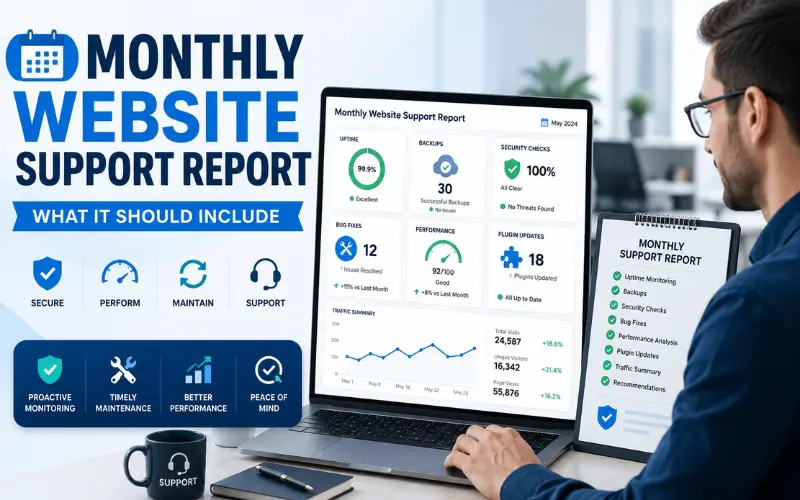
A professional support provider should give you a monthly report. This helps you understand what was done and what needs improvement.
A monthly report may include:
- Completed updates
- Backup status
- Security scan results
- Uptime report
- Speed report
- Broken link report
- Technical SEO issues
- Fixed bugs
- Pending recommendations
- New risks or warnings
Reports build trust and show that the support team is actively maintaining your website.
How Much Technical Website Support Do You Need?
The amount of support depends on your website size, traffic, platform, and business goals.
You may need basic support if you have a small business website with a few pages.
You may need advanced support if you have:
- An online store
- A membership website
- A booking system
- A high-traffic blog
- A custom-coded website
- Multiple landing pages
- Payment integrations
- Important lead forms
- Regular content updates
The more your business depends on your website, the stronger your support plan should be.
FAQs
What is technical website support?
Technical website support is the ongoing service of monitoring, updating, securing, fixing, and improving a website so it works properly for users and search engines.
Why do I need technical website support?
You need technical website support to prevent downtime, protect your website from security threats, fix errors, improve speed, keep software updated, and avoid losing customers because of technical problems.
Is technical website support the same as website maintenance?
They are similar, but technical website support is broader. Website maintenance focuses on regular updates and care, while technical support also includes troubleshooting, emergency fixes, hosting issues, technical SEO, and advanced problem solving.
How often should my website be checked?
A small website should be checked at least once a month. Business websites, blogs, and online stores should be checked more often because technical issues can affect traffic, leads, and sales.
Does technical website support improve SEO?
Yes, it can support SEO by fixing slow pages, broken links, crawl errors, mobile usability issues, redirect problems, indexing issues, and other technical problems that affect search performance.
Can technical support fix a hacked website?
Yes, many technical support providers can remove malware, clean infected files, restore backups, close security gaps, and improve protection after a hack.
Do small websites need technical support?
Yes, even small websites need basic support. At minimum, every website should have backups, updates, security checks, SSL monitoring, and contact form testing.
What should I look for in a support provider?
Look for clear services, fast response time, backup management, security knowledge, technical SEO skills, platform experience, monthly reporting, and emergency support options.
Is website backup included in technical support?
Most good support plans include backups. However, you should confirm how often backups are created, where they are stored, and whether they are tested.
Can I update my website myself?
You can update simple content yourself, but technical updates should be handled carefully. Updating plugins, themes, code, or server settings without experience can break your website.
Conclusion
Technical website support is essential for keeping your website secure, fast, updated, and reliable. A website is not finished after launch. It needs regular care to prevent downtime, fix errors, protect data, improve performance, and support SEO.
A complete support plan includes uptime monitoring, backups, security checks, CMS updates, malware scanning, speed optimization, technical SEO fixes, broken link checks, form testing, and emergency recovery. These services help your website perform better for both users and search engines.
If your website helps your business get leads, sales, bookings, or customer trust, technical website support is not an unnecessary cost. It is a smart investment that protects your online presence and helps your website grow with your business.
You May Also Like It:
Website Performance Monitoring